Skip to content
DeskFolio: the free PDF editor that never uploads / See what it does
DESKLAB / FLAGSHIP · DESKFOLIO

Every PDF job.
Nothing uploaded.

DeskFolio reads, signs, compresses and converts PDFs on your own computer. Merge and split, fill in forms and sign them, shrink big scans for email, turn PDFs into Word or Excel, and make scans searchable. Free, with no account and no watermark.

✓ Windows 10/11 · macOS · Linux · v0.2.0 · free and open source
FREE · OPEN SOURCE · OFFLINE THE PDF TOOL THAT NEVER UPLOADSDL / 003
DL / 003 · THE FLAGSHIP

DeskFolio

Everything you do to a PDF, offline.

Read, rearrange, sign and convert PDFs without uploading them to a website. Merge and split files, shrink big scans for email, fill in forms and add your signature, turn PDFs into Word or Excel, and make scanned pages searchable. Your files never leave your computer.

01

View and search

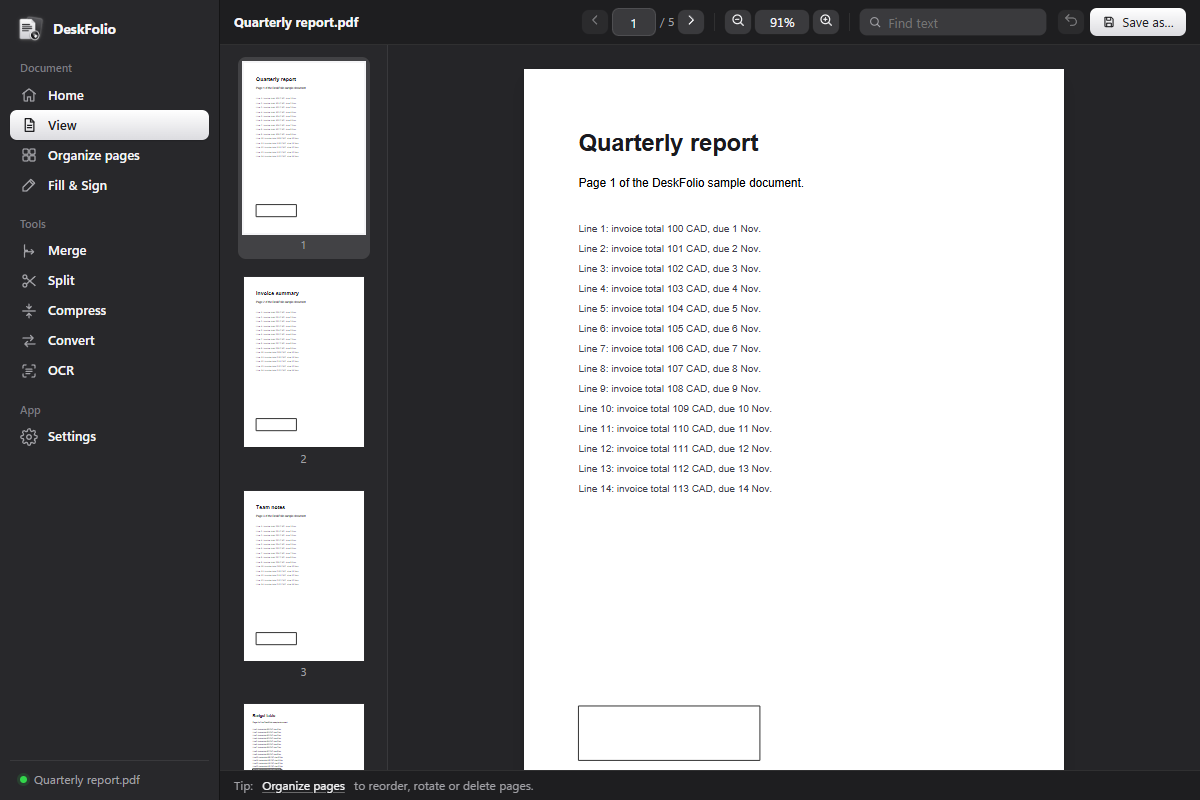
Thumbnails, zoom, find text, and password-protected PDFs.

02

Organize pages

Drag to reorder, rotate, delete or pull pages out into a new file.

03

Merge

Join any number of PDFs into one, in the order you choose.

04

Split

By page ranges, every few pages, or just the pages you pick.

05

Compress

Three strengths. Photos shrink, text stays sharp, never bigger than before.

06

Fill & Sign

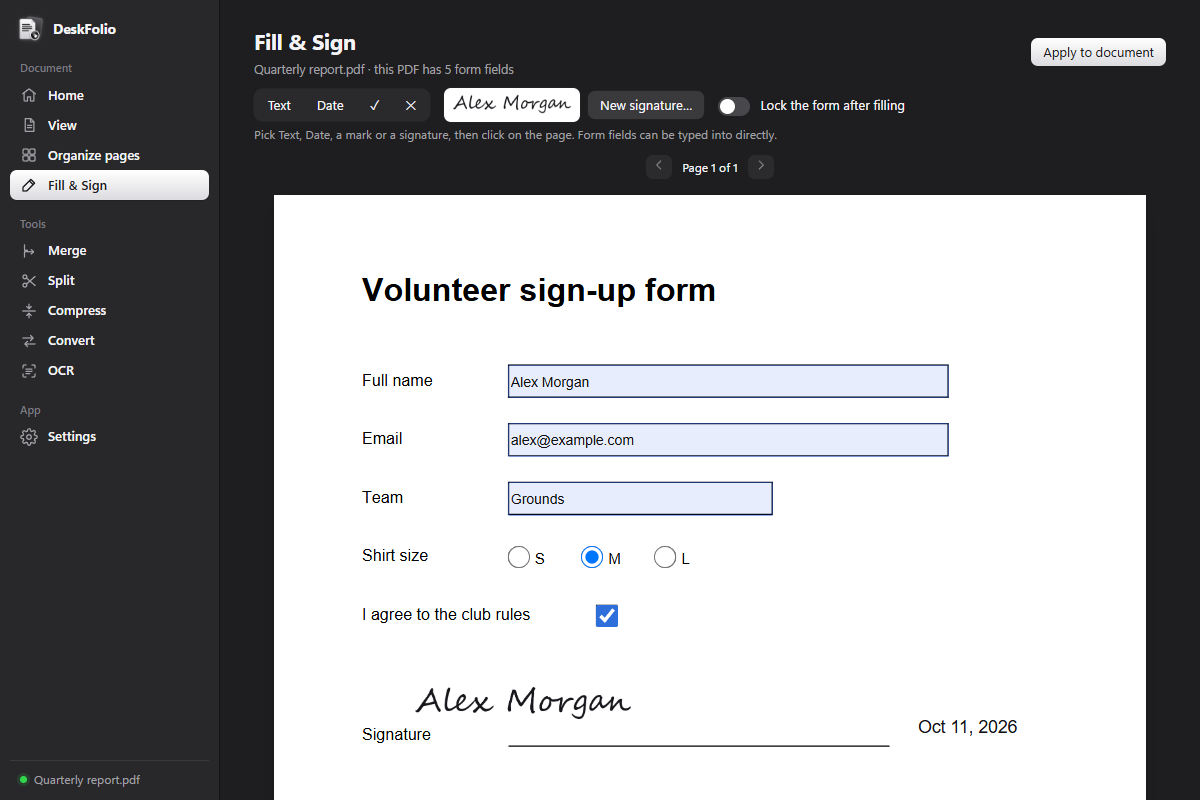
Type into forms, add text, dates and ticks, and sign. Signatures stay on your computer.

07

Convert

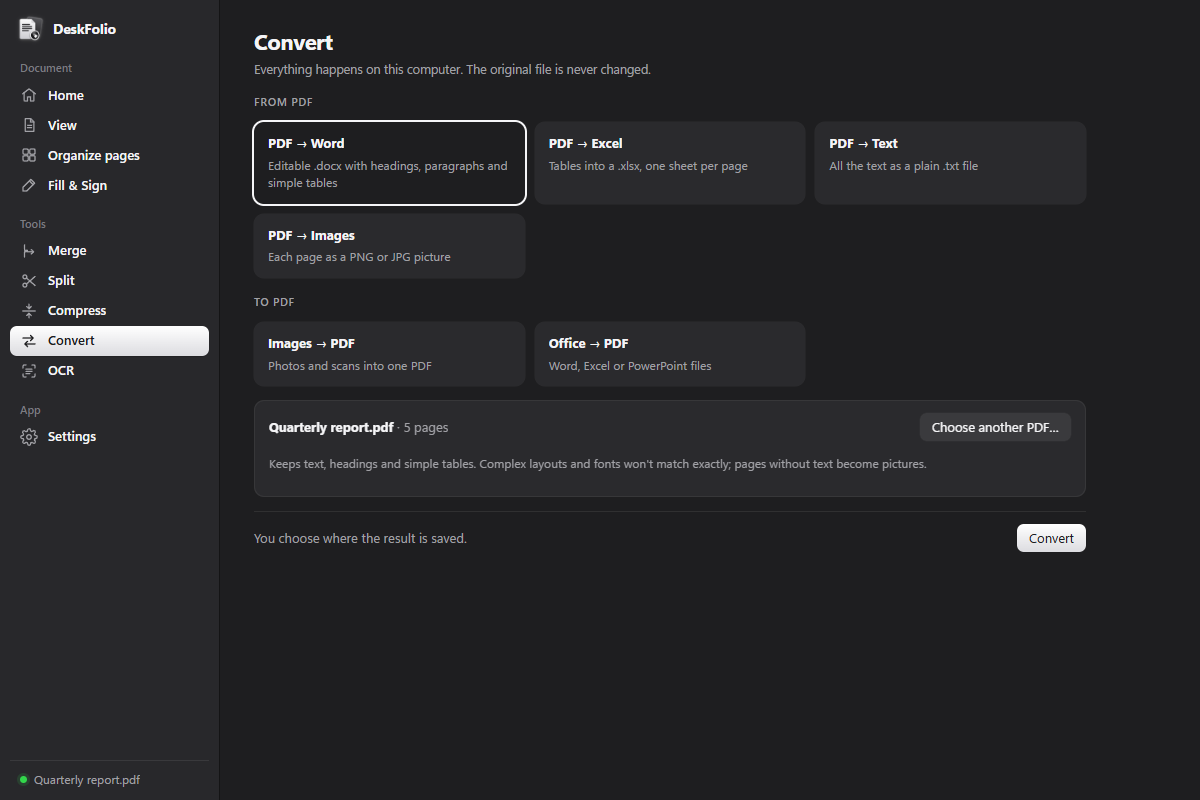
PDF to Word, Excel, text or images. Word, Excel, PowerPoint and images to PDF.

08

OCR

Make scanned pages searchable and copyable without changing how they look.

DeskFolio's Fill & Sign page: a form filled in, with a handwritten-style signature and a date.
Fill in a form and sign it, no printer needed.
DeskFolio viewing a PDF with page thumbnails, zoom and a Find text box.
Thumbnails, zoom and search.
DeskFolio's Convert page with PDF to Word, Excel, Text and Images, and Images or Office files to PDF.
Convert both ways, on your computer.

Why offline matters for PDFs

  • Your contracts stay yours. Online PDF sites ask you to upload the file first. DeskFolio never sends it anywhere.
  • No sign-up, no watermark, no daily limit. The tenth merge of the day works like the first.
  • Works on a plane. Every tool, OCR included, runs without an internet connection.
  • Your original is safe. Changes save to a new file unless you choose to overwrite.
Windows 10/11macOSLinux
VERSION 0.2.0 · WINDOWS INSTALLER 11.6 MB · MIT LICENCE
ALSO IN DESKLAB

Small helpers
around DeskFolio.

Three more free tools in the same family, with the same menus, the same rules and the same promise: offline, open source, no account.

DL / 001 FILES
SORT · FIND · UNDO
v0.5.0

DeskZero

Your files, finally in order.

↗

Sorts messy Downloads and Desktop folders by rules you control, finds duplicates, and finds any file or app from a search bar on Ctrl+Shift+Space.

OrganisingSearchDuplicates
WINDOWS 10/11 · MACOS · LINUX
+

The lab is still growing. Next on the workbench: a batch photo tool, then a clipboard history.

NEXT UP / DL 005
DL / 001 · FILES

DeskZero

Your files, finally in order.

Drop loose files into one folder and DeskZero sorts them into Images, Documents, Videos and more, by simple rules you control. It can watch Downloads and Desktop in the background, finds duplicate files, and a search bar on Ctrl+Shift+Space finds files, folders and apps from anywhere.

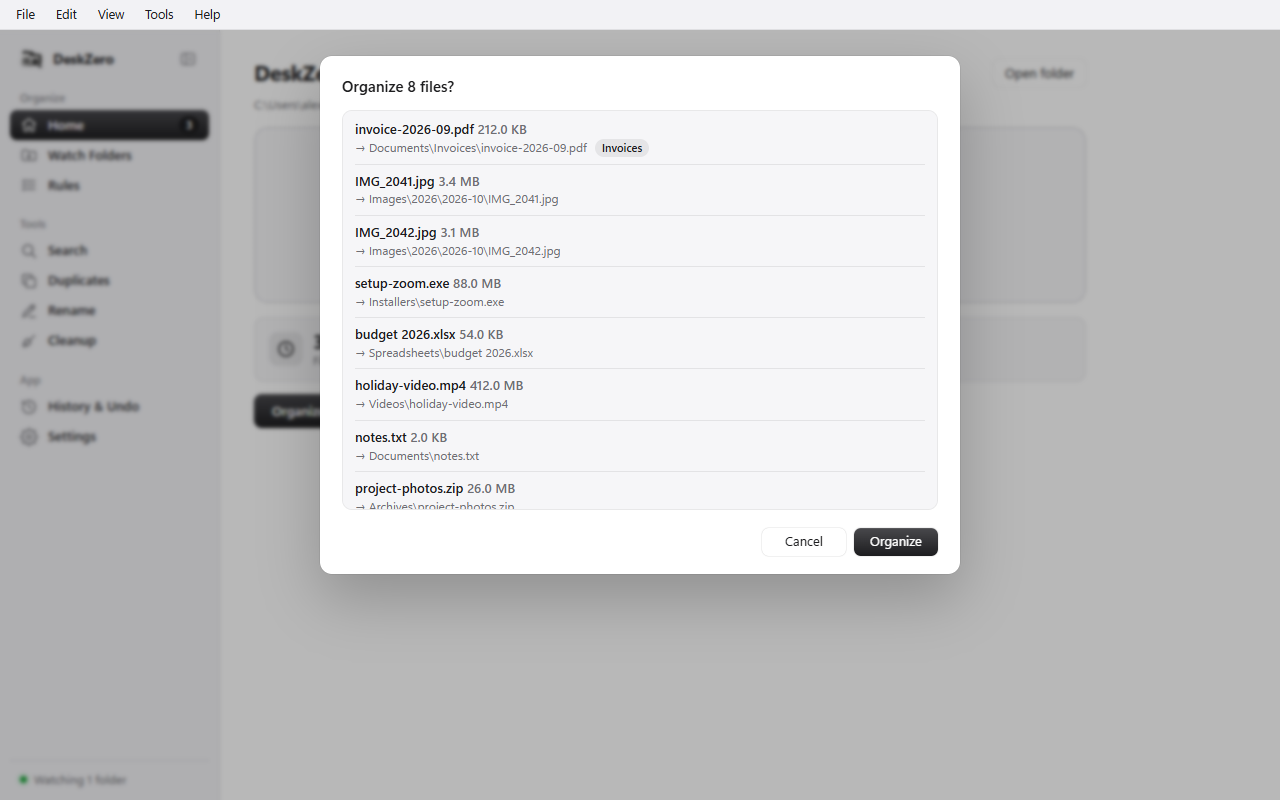
  • A preview of every move before it happens: nothing moves without your OK, and every batch can be undone
  • Rules like “name contains invoice → Documents/Invoices”, matching on name, extension, type, size and dates; photos can go into folders by the day they were taken
  • Watches folders like Downloads in the background and picks up a file only once it has finished downloading
  • Universal search on Ctrl+Shift+Space, a duplicate finder that compares file contents, and an archive for files untouched in months
  • Never deletes a file, never overwrites by default, and leaves hidden and system files alone
Windows 10/11macOSLinux
VERSION 0.5.0 · WINDOWS INSTALLER 2.8 MB · MIT LICENCE
DeskZero's Organize 8 files? preview listing each file and the folder it will move to, such as an invoice going to Documents › Invoices.
The preview before anything moves.
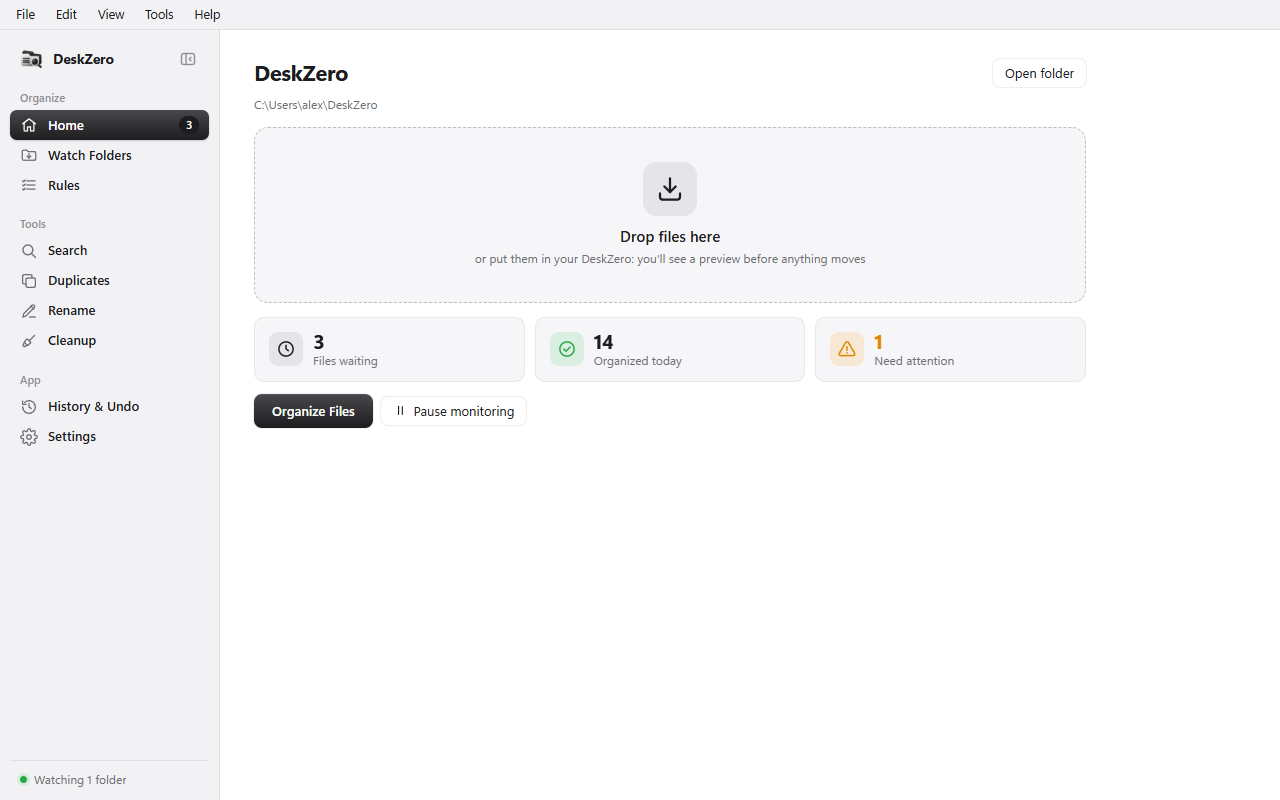
DeskZero's home screen: a Drop files here area and counters for files waiting, organized today and needing attention.
Drop files in, see what's waiting.
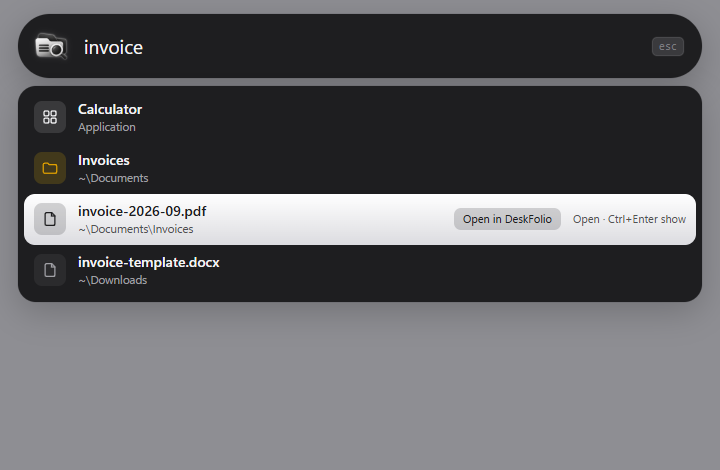
DeskZero's search bar finding invoice files, with an Open in DeskFolio button on the selected PDF.
Ctrl+Shift+Space finds anything.
DL / 002 · WINDOWS CARE

DeskMedic

A first-aid kit for Windows PCs.

A toolkit for the moments a PC misbehaves: see what fills a disk in seconds, clear temporary files safely, check the PC's health, find where the internet breaks, and run one-click remedies for everyday problems. Everything that changes something is shown first, and every change goes into a log you can export for a ticket.

  • Disk map reads an NTFS drive straight from its file table: a whole drive mapped in seconds, with a treemap, the largest files and old user profiles
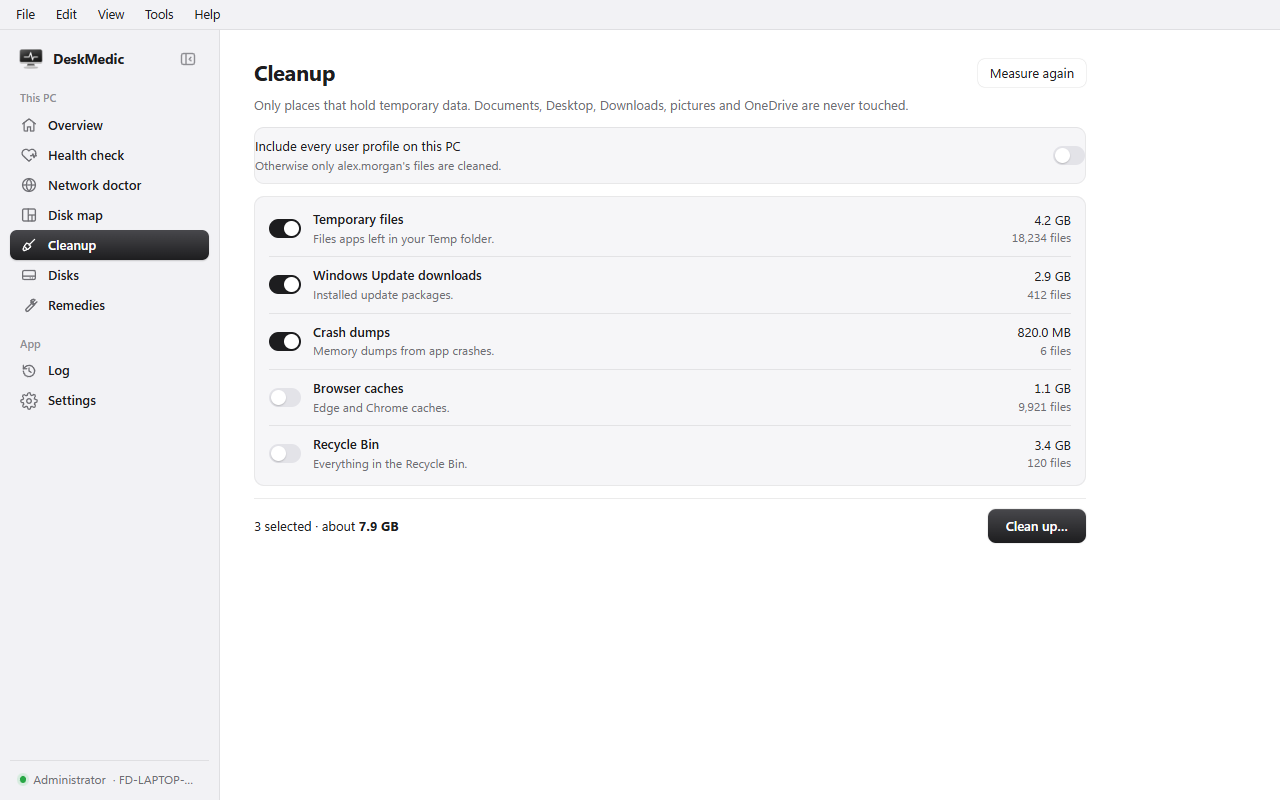
  • Cleanup measures first, then clears temp files, update leftovers, crash dumps and browser caches; your documents, pictures and OneDrive are never touched
  • Health check and network doctor say in plain English what is wrong and what to do next: “reaches the router but not the internet”
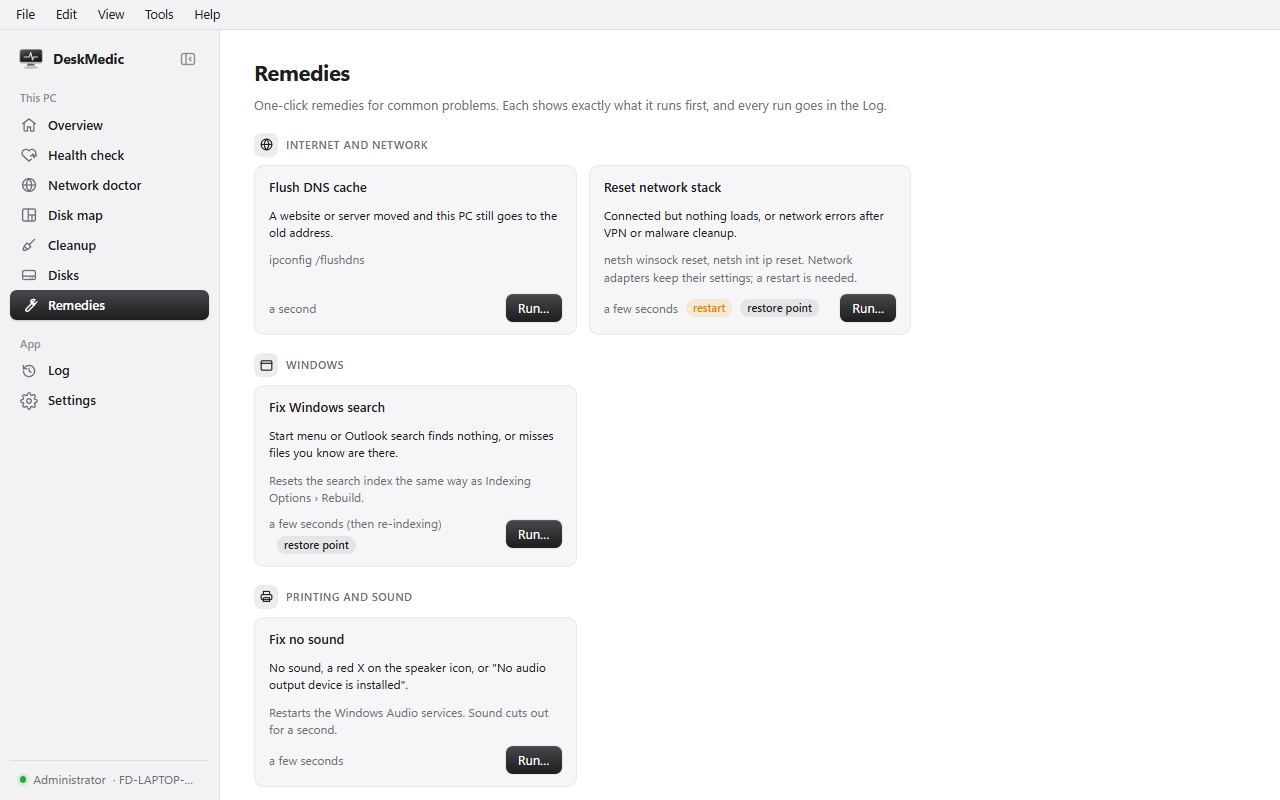
  • Fifteen one-click remedies (DNS, print queue, Windows Update, Teams, no sound and more), with a restore point first for the risky ones
  • Sits quietly in the tray, checks the PC every hour, and speaks up only when something looks wrong; Export report makes one zip for the helpdesk
Windows 10/11
VERSION 0.6.0 · 3 MB INSTALLER, OR AN 8 MB PORTABLE APP FOR A USB STICK · MIT LICENCE
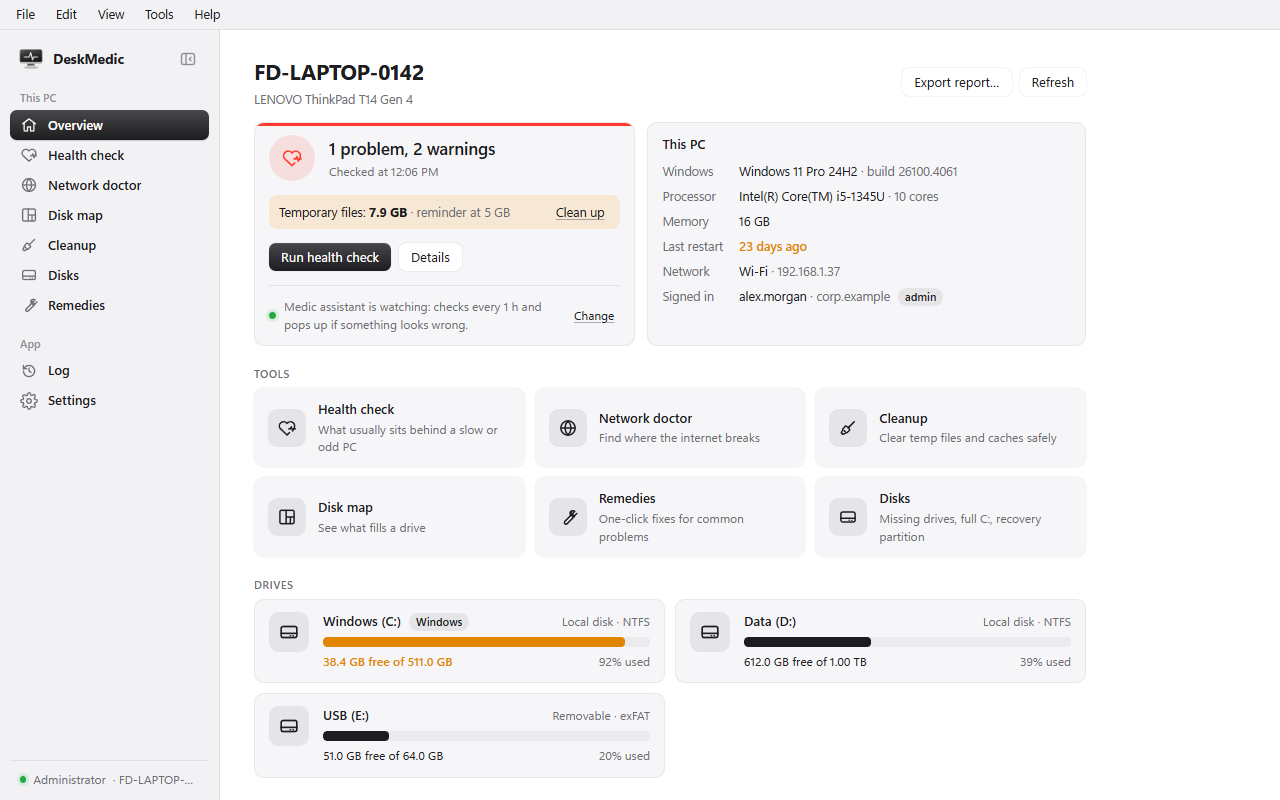
DeskMedic's overview of a laptop: 1 problem and 2 warnings, 7.9 GB of temporary files, PC details, tool tiles and three drives.
The whole PC at a glance.
DeskMedic's Cleanup page listing temporary files, update downloads, crash dumps and browser caches with sizes.
Cleanup: measured first, your files never touched.
DeskMedic's Remedies: flush DNS, reset the network stack, fix Windows search and fix no sound, each with what it runs.
One-click remedies, each one explained.
DL / 004 · NEW

DeskShot

Screenshots that stay yours.

Press Ctrl+Shift+2 and the screen freezes, menus and pop-ups included. Drag an area or click a window, then mark it up with arrows, boxes, text and numbered steps, black out private details, copy the words in the picture, or pin it on top while you work. Every capture is kept, and you can search them by the text inside.

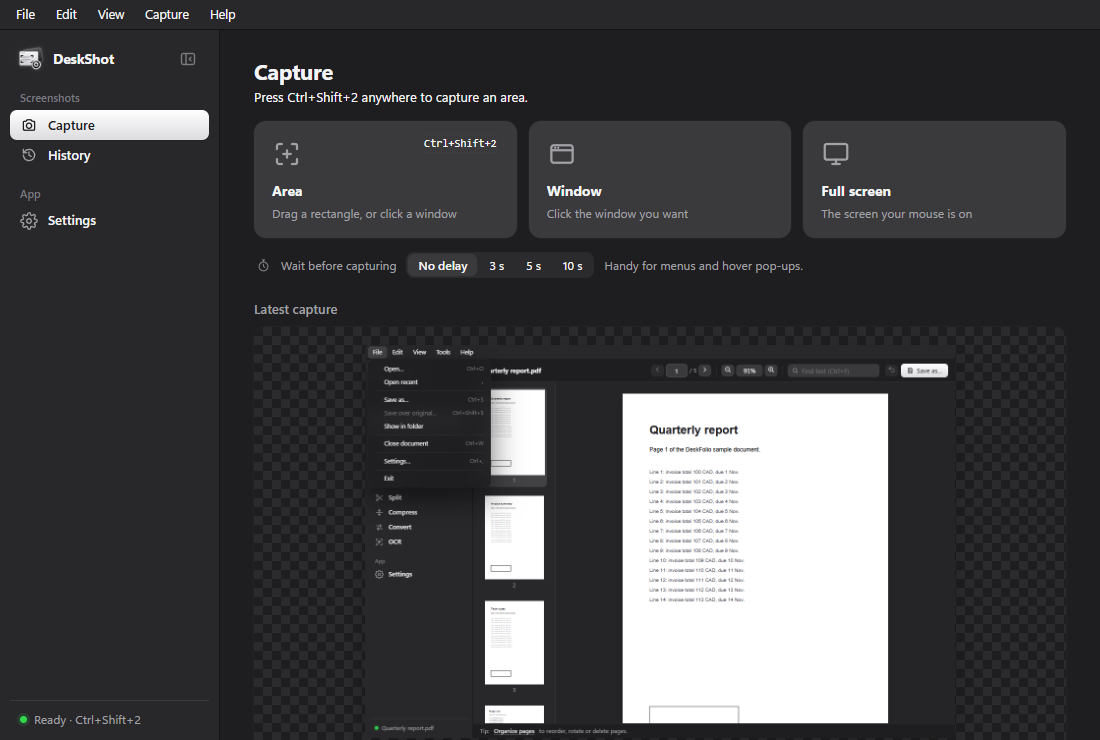
  • Area, window or full screen, with a magnifier for exact pixels and a 3, 5 or 10 second delay for menus
  • Editor with arrows, boxes, text, highlighter, numbered steps, crop, pixelate and black out, with undo
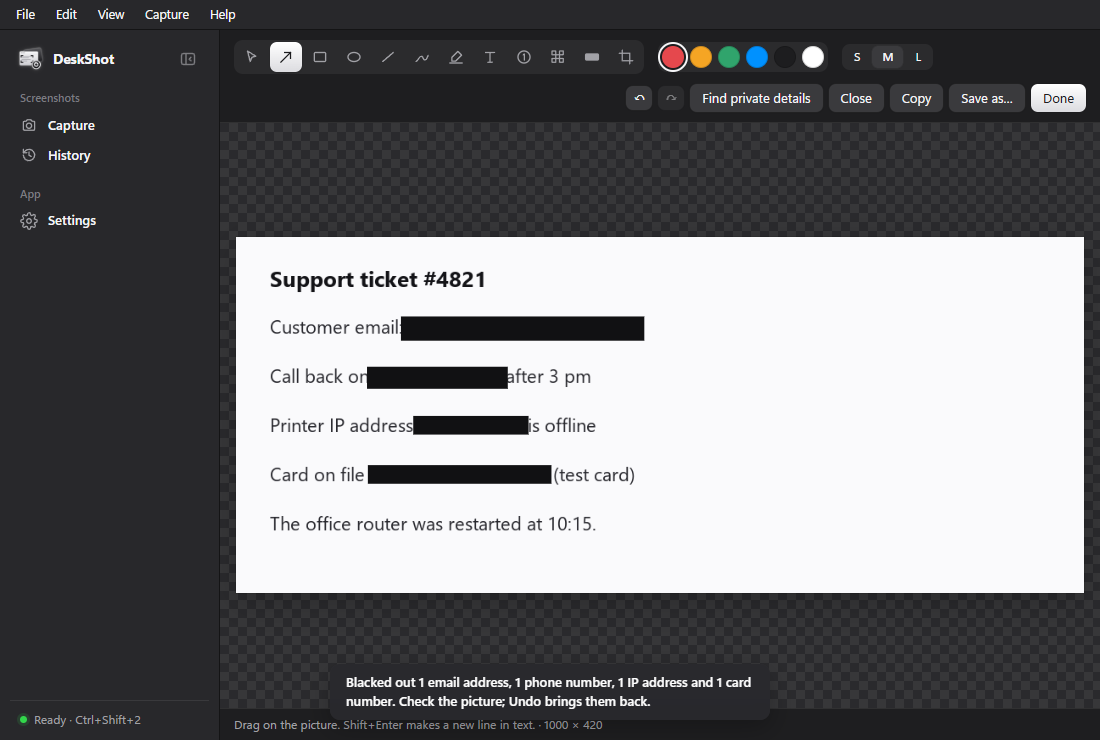
  • Find private details blacks out email addresses, phone numbers, IP addresses and card numbers in one step, and one Undo brings them back
  • Copy text reads the words in a capture offline; History finds old captures by the words inside them
  • Pin keeps a capture floating on top of every window while you work
Windows 10/11macOS
VERSION 0.1.0 · WINDOWS INSTALLER 8.9 MB · MIT LICENCE
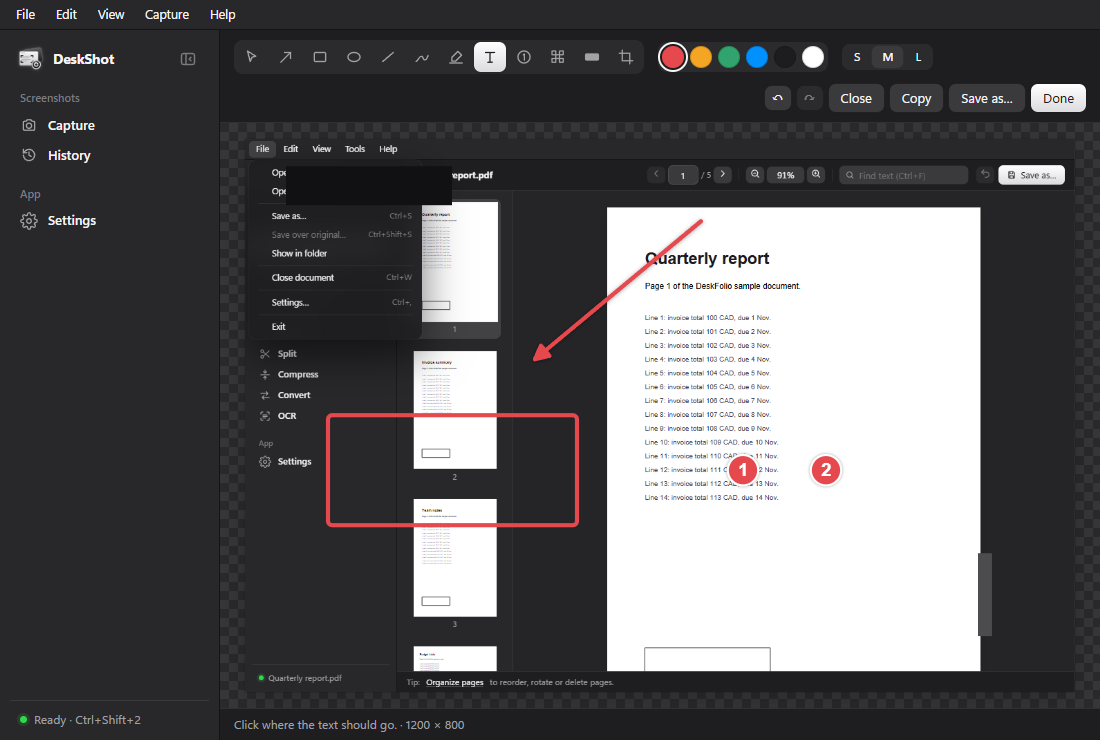
DeskShot's editor with an arrow, a red box, numbered steps and a blacked-out area on a captured window.
Arrows, boxes, steps and black-out.
DeskShot after Find private details: an email, a phone number, an IP address and a card number blacked out on a support ticket.
Private details found and blacked out.
DeskShot's Capture page with Area, Window and Full screen buttons and the latest capture below.
Area, window or full screen.
ONE FAMILY

Better together,
fine on their own.

Install one or all four. When more than one is on your computer, they hand work to each other.

→

Find a PDF, open it in DeskFolio

Search with Ctrl ⇧ Space in DeskZero, pick a PDF and press Alt Enter: it opens straight in DeskFolio.

+

The same feel everywhere

Every app has the same menu bar, a compact sidebar, Ctrl K to search its commands, F1 for shortcuts, and light and dark themes.

Each app opens the others

Help › More DeskLab tools opens any of the others you have installed, or takes you to its free download. Updates arrive by themselves, signature-checked.

OUR APPROACH

Software should
feel considered.

Not bigger. Not noisier. Just better at the thing you opened it to do.

01

Shows its work first

You see exactly what a tool is about to do (every move, every delete, every fix) before anything happens.

↗
02

A way back

Moves can be undone, edits have Undo, risky fixes make a restore point first, and every change is written to a log you can read.

↗
03

Yours, offline

No account, no cloud, no ads, no telemetry. Your files never leave your computer; the only thing that goes online is a daily update check you can switch off.

↗
04

Free and open

Every tool is MIT-licensed, with its whole source on GitHub. No paid tier waiting behind a button.

↗
START WITH DESKFOLIO

Your next PDF
stays on your computer.

Free for Windows, macOS and Linux. No account, no upload, no watermark.

Download DeskFolio ↓
GOOD TO KNOW

A few quick
answers.

Is DeskFolio really free, with no watermark? +

Yes. DeskFolio is free and open source under the MIT licence. It adds no watermark, has no daily limit and needs no account. Your PDFs are never uploaded: every tool, OCR included, runs on your computer.

Can DeskFolio change the words already in a PDF? +

Not yet. Today it fills in forms, adds text, dates, ticks and signatures on top of a page, reorders and removes pages, and converts a PDF to Word when you need to rewrite it. Editing the existing text in place is planned for a later version.

Does Convert need Microsoft Office? +

PDF to Word, Excel, text and images works on its own. Turning Word, Excel or PowerPoint files into PDF uses the Microsoft Office or LibreOffice already on your computer; DeskFolio tells you if neither is there.

What is DeskLab? +

The family DeskFolio belongs to: four free desktop tools. DeskFolio does everything you need with PDFs, DeskZero keeps folders tidy, DeskMedic checks and fixes Windows PCs, and DeskShot takes and marks up screenshots. Each has one clear job and they all look and work alike.

Are they really free? +

Yes. They're open source under the MIT licence: no ads, no trial, no paid version. The code is on GitHub.

Do they need the internet or an account? +

No. Everything happens on your computer. The only time a tool goes online is a once-a-day check for updates, which you can turn off in its Settings. DeskMedic's network doctor also tests your connection, but only when you press the button.

Which computers do they run on? +

DeskZero and DeskFolio: Windows 10/11, macOS and Linux. DeskShot: Windows 10/11 and macOS. DeskMedic: Windows 10/11 (it fixes Windows things), as an installer or a portable app that runs from a USB stick.

Windows says “Windows protected your PC”. Is that safe? +

The Windows installers aren't code-signed yet, so Windows warns about any new download it doesn't recognise. Choose More info, then Run anyway. The Mac versions are signed and notarized by Apple and open normally. Every download comes straight from the tool's GitHub release page.

How do updates work? +

Each installed tool checks once a day, downloads a new version quietly, checks its signature, and asks you to restart. You can switch automatic updates off in Settings.

Found a problem or have an idea? +

Open an issue on the tool's GitHub page (Help › Report a problem inside each app takes you there). DeskLab is made by Jagdeep Sandhu in Revelstoke, BC.